Macro photography with the iPhone
Got inspired by this article on how to use a water drop to create a macro lens for the iPhone. So tested that today and here is the result:

Got inspired by this article on how to use a water drop to create a macro lens for the iPhone. So tested that today and here is the result:
I brought my Holux M-241 on our last hike in the Swedish mountains and wanted to use the tracks to geotag all photos. So when I got home I used the Holux Utility software to download all tracks. Worked fine and I uploaded all to WikiLoc but when then to geocode all the images in Ligthroom I tried to use Jeffrey Friedls GeoEncoding plugin but realised it couldn’t handle the kml files. After some fiddling around I found out that the timestamps where missing in the kml files.
After some googling I found out what options to use on GPSBabel to get it working. It was mentioned here.
gpsbabel -p “” -w -i gnav_trl -f “OLDFILE.trl” -o gpx -F “NEWFILE.gpx”
So using those options with all the different trl-files I got from the unit I managed to create one gpx file that Jeffrey’s excellent plugin could manage. Then I used Jeffrey’s other plugin to upload all the photos to Flickr where they can be viewed on a map!
Next time I’ll try to use the built in functionality of GPSBabel to download data directly from the Holux M-241. In the same thread it was mentioned one should do:
Windows (if on COM10): gpsbabel -t -r -w -i m241 -f COM10 -o gpx -F data.gpx
though have not tried it yet.
Tags: photo, geotagging, gpsbabel, lightroom
Är inte nöjd med den bandbredd jag får ut från min ADSL och pågrund av att jag bor över 3500 m från stationen är det inte mycket som går att göra, speciellt vad gäller bandbredden upp. Detta får ju som konsekvens att de som kollar på bilder på min sajt får en ganska seg upplevelse. Så har börjat titta runt på lite olika alternativ att istället hyra en del i en server istället, så kallad VPS(Virtual Private Server)
Hittade lite olika svenska alternativ med bara IPeer tilllåter en att testa på. Har ansökt men inte kommit igång o test än.
Hittade även Gandi och Slicehost. Gandi verkar ha en väldigt flexibel lösning och till hyffsat bra pris och det går att testa på en månad gratis vilket Slicehost inte erbjuder. Så har precis skickat över en stor det av min web till Gandi och det verkar fungera utmäkrt. Och de har MYCKET högre bandbredd än mitt ADSL kan ge. Så tex denna sida bör ladda mycket snabbare här.
Har fört över alla filer från hemma servern så nu skall det mesta ligga här http://92.243.25.1/privat/
Måste dock se till och peka om DNSen och även få upp WordPress och bloggarna med, men skall ta och test köra Gandi ett tag nu.
Mixing in old photos or photos from another time can create interesting compositions, like this one from Flickr, found via A Time To Get

or this one from the Flickr group Looking into the Past
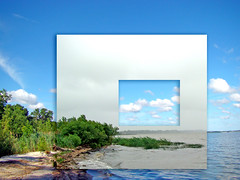
Other interesting combinations are; night/day, summer/winter, crowded/deserted etc. Have to try this sometime!
Tags: photography, inspiration
I’m having some problems with this blog and posting from Flock. All lt; and gt; are removed from blog posts using Flocks built in blog post function.
a href=”http://getsatisfaction.com/flock/topics/all_and_are_removed_when_publishing_a_blog_post_with_flock?utm_content=topic_linkamp;utm_medium=emailamp;utm_source=reply_notification”Reported it/a using GetSatisfaction and there might be a solution to it, according to this a href=”https://bugzilla.flock.com/show_bug.cgi?id=16002#c16″bug report/a.
!– technorati tags begin –p style=”font-size:10px;text-align:right;”Tags: a href=”http://technorati.com/tag/flock” rel=”tag”flock/a, a href=”http://technorati.com/tag/bug” rel=”tag”bug/a, a href=”http://technorati.com/tag/wordpress” rel=”tag”wordpress/a/p!– technorati tags end —
I’m very used to unix systems and there it is very common to use symbolic links. Say you mount another machine at /machine2 but want to access some files from it in your home directory on that machine but have them in the home directory on this machine. Just use ln, ln -s /machine2/home/user/file /home/user/file and there is no difference in using file on any machine. This has not been possible in Windows until Vista was released!
Another way to explain it is it is possible to map a remote folder not just into a drive(e.g. Z:) but also onto a folder!
The solution is the new mklink command, this article explains well how to use it!
Tags: vista, symboliclink
This article explains how you can create a ringtone for your iPhone from any DRM free song in iTunes!
Wikipedia har rätt mycket information om Tirpitz och denna sajt har en hel del bilder över både skeppet och haveriplatsen. Denna text var också intressant.
På dykkepedia.org kan man hitta fler bra dykplatser i Norge.
Tags: vrakdykning, dykning
Today I should print a number of photos for a friend. So I thought I should give Lightroom a try and I was close to give up when I finally solved it…
This great guide from Steves digicams solved it for me. Basically what I had missed earlier was when disabling the ICM I still had “Photo” chosen as type, it shall be “None”. I also had some effect settings as well but once everything was deselected it worked like a sharm!
In the Canon ICC Profile Guide you can find out what kind of papers the different profiles are for:
MP = Matte paper
PR = Photo Paper Pro
SP = Photo Paper Plus Glossy
Thats about it!
Tags: photo, printing, photography
Great concept, you just book a surprise trip and show up at the airport. You know for how long but no clue where! Imaginative Traveller’s new concept is described in more detail here.
Tags: travel